skip to content

UPSRTC

  • About Us
  • Contact us
  • Tools
    • UPSRTC Cancellation Refund Calculator – Know Your Exact Refund Before Cancelling
    • UPSRTC Route Finder – Find Buses, Fares and Journey Time for Any Route
    • UPSRTC Bus Stand Finder – Address, Timings and Routes for Every City
    • UPSRTC Bus Timetable 2026 – Departure Times for All Major Routes
    • UPSRTC Bus Pass Savings Calculator – Find Out If a Pass Is Worth It
    • UPSRTC Fare Calculator 2026 – Check Bus Fare Online
    • Download UP-RAAHI — Book & Manage UPSRTC Bus Tickets
    • UPSRTC Bus Booking – Check Availability, BusTime & Bus Stands
  • हिंदी

How To Register on the UPSRTC Online Portal – Step By Step [2025]

How To Register on the UPSRTC Online Portal
UPSRTC August 26, 2025 0

What you’ll do: Create a passenger account on the UPSRTC Online portal so it’s easier to book, cancel, and reprint tickets later. The portal shows options for “Register / Login” and also allows Guest Booking if you don’t want an account.

Tip: Labels in the portal may vary slightly (it’s a single-page app). If you see “Register,” “Sign Up,” or a profile icon near the top-right, you’re in the right place.

Table of Contents

Toggle
  • STEP-BY-STEP UPSRTC Registration
  • Register In the UP Raahi App
  • Troubleshooting 
    • FAQs
  • Related Guides

STEP-BY-STEP UPSRTC Registration

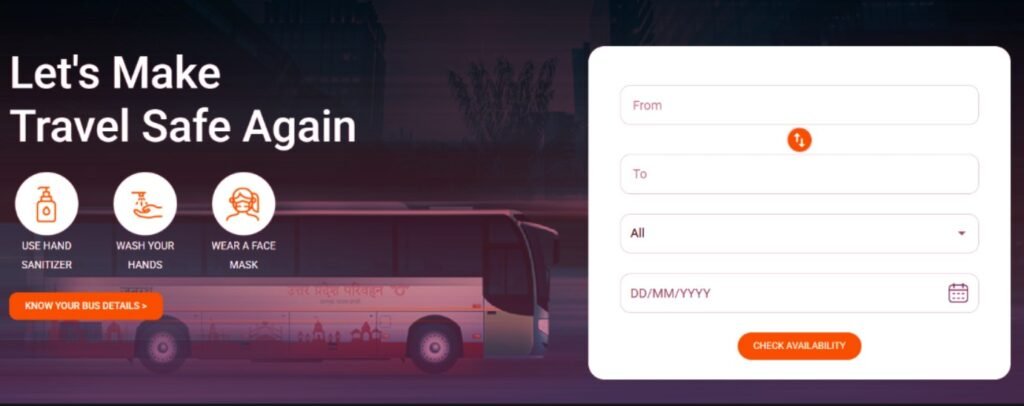
  • Open the UPSRTC Registration portal
    • Type onlineupsrtc.co.in in your browser. If you start from the main UPSRTC site, use its Online Registration link.
Online Booking
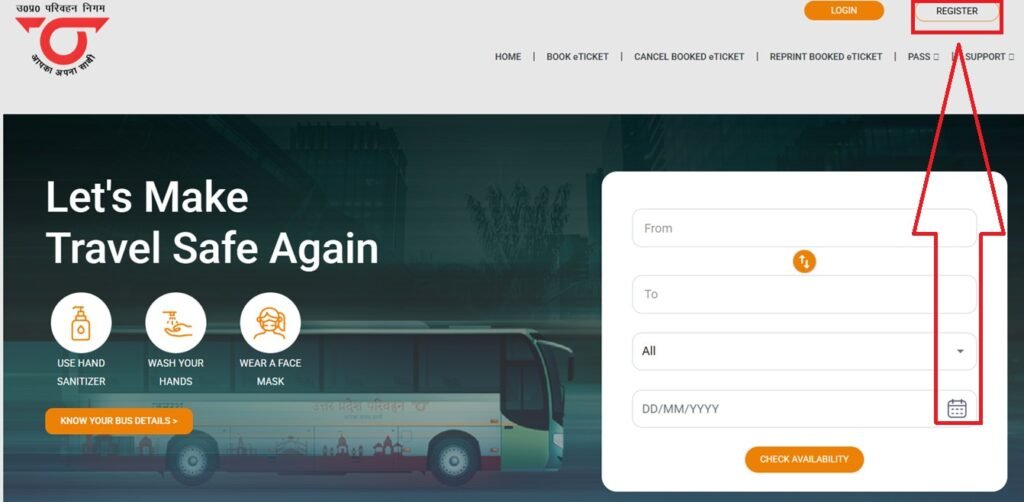
  • Click “Register” (top-right)
    • You’ll see options like REGISTER / LOGIN on the header. Click REGISTER.
UPSRTC Registration
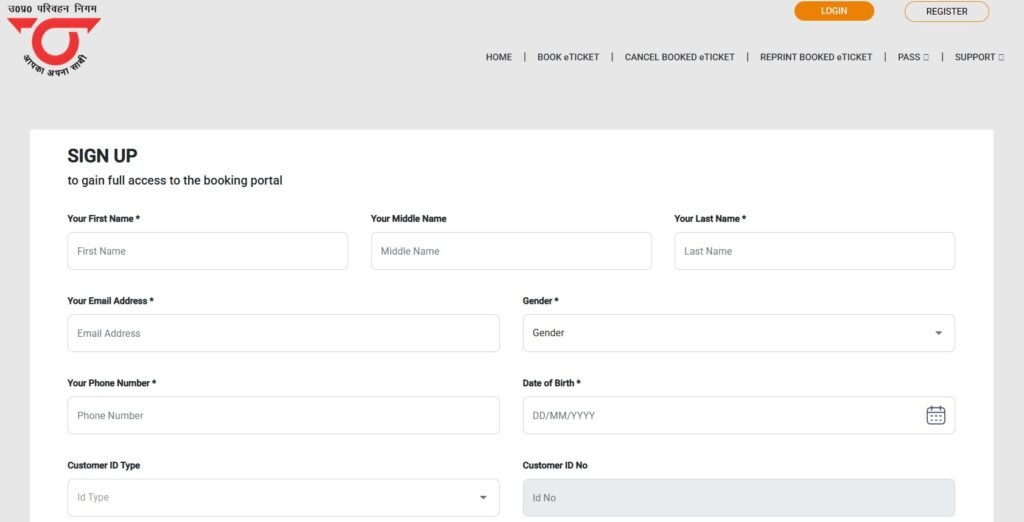
  • Enter your contact details
    • The portal typically asks for a mobile number and/or email.
    • You may get an OTP to verify your contact; enter it to continue after fill all details .
UPSRTC Registration Form Filling
  • Create your password
    • Set a strong password. Keep it somewhere safe (or use a password manager).
  • Fill in your profile basics
    • Name and other passenger details. (Some fields may be optional.) Save/continue.
  • Submit and sign in
    • After successful registration, use your mobile/email + password to log in. You can now book normally; your details auto-fill during checkout.

Good to know: You can still use “Guest Booking” without an account. Registration is convenient for saved details and easier management, while Guest Booking works fine for one-off trips

Register In the UP Raahi App

Prefer mobile? UPSRTC’s official UP-RAAHI app supports registrations and ticket management (book, cancel, view tickets). Install it from Google Play or the App Store and sign up with your mobile/email. Some news coverage notes that identity proof can be requested during app registration—follow the in-app prompts.

Troubleshooting 

  • No OTP received: wait 60 seconds, check signal/DND, then request OTP again.
  • Email not arriving: check spam, and verify you typed the right address.
  • Already booked as a guest? You can still create an account now; future bookings will be easier.
  • Booked on a partner (redBus/Paytm/MMT)? You can still register on the UPSRTC portal for future trips, but manage that partner booking from the partner account.

FAQs

Do I need an account to book?

No—Guest Booking is available on the portal. Registration is optional but handy for repeat travel.

Can I cancel or reprint without an account?

Yes—the portal exposes dedicated options (e.g., Reprint/Print, Cancel Ticket). You’ll need your PNR/mobile/email even if you booked as a guest.

Is there any fee to register?

No, creating an account on the portal/app is free (you only pay when you buy tickets).

Related Guides

  • How to Log In to UPSRTC Portal
  • Book Your First UPSRTC Ticket Online
  • Apply for UPSRTC Bus Pass After Registration
  • UPSRTC Helpline – Registration Issues
Tags: upsrtc, UPSRTC Registration
Category: 
  • Portal & Login
  • UPSRTC

Posts navigation

Previous Article Previous Article
How to Reprint a UPSRTC e-Ticket (Official Portal & App) — Step by Step [2025]
Next Article Next Article
UPSRTC Login Guide: How to Sign In on onlineupsrtc.co.in (2025)

Recent Posts

  • UPSRTC Varanasi to Prayagraj Bus: Fare, Timings, Booking & Route
  • UPSRTC Lucknow to Varanasi Bus: Fare, Timings, Booking & Route
  • UPSRTC Lucknow to Delhi Bus: Fare, Timings, Booking & Route
  • UPSRTC Varanasi to Lucknow Bus: Fare, Timings, Booking & Route
  • UPSRTC Agra to Delhi Bus: Fare, Timings, Booking & Route
  • About Us
  • Contact us
  • Disclaimer
  • Download UP-RAAHI — Book & Manage UPSRTC Bus Tickets
  • Privacy Policy
  • UPSRTC – Uttar Pradesh State Road Transport Corporation
  • UPSRTC Bus Booking – Check Availability, BusTime & Bus Stands
  • UPSRTC Bus Pass Savings Calculator – Find Out If a Pass Is Worth It
  • UPSRTC Bus Stand Finder – Address, Timings and Routes for Every City
  • UPSRTC Bus Timetable 2026 – Departure Times for All Major Routes
  • UPSRTC Cancellation Refund Calculator – Know Your Exact Refund Before Cancelling
  • UPSRTC Fare Calculator 2026 – Check Bus Fare Online
  • UPSRTC Route Finder – Find Buses, Fares and Journey Time for Any Route

Recent Posts

  • UPSRTC Varanasi to Prayagraj Bus: Fare, Timings, Booking & Route
  • UPSRTC Lucknow to Varanasi Bus: Fare, Timings, Booking & Route
  • UPSRTC Lucknow to Delhi Bus: Fare, Timings, Booking & Route
  • UPSRTC Varanasi to Lucknow Bus: Fare, Timings, Booking & Route
  • UPSRTC Agra to Delhi Bus: Fare, Timings, Booking & Route

⚠️ Important

This is not the official UPSRTC website. 
We cannot help with bookings, PNR queries, or cancellations. 
For official support visit upsrtc.org.in or call +91-522- 2622363, 1800-180-2877.

Images

UPSRTC MST Pass Online
upsrtc helpline number
UPSRTC Helpline
upsrtc payroll login
upsrtc online booking login
How To Register on the UPSRTC Online Portal
UPSRTC Registration

Archives 

  • July 2026
  • June 2026
  • May 2026
  • August 2025
  • June 2025

2026 UPSRTC

EnglishenEnglishEnglish
EnglishenEnglishEnglishHindihiHindiहिंदी